Bring in almost any video
Paste a supported video URL or open a local file. The source lands directly inside the same workspace where the rest of the job happens.
Paste a link or open a file. Download, transcribe, translate, review, dub, clip, and export—in one desktop app.
Free to install. Downloads, subtitle editing, merging, and standard exports stay free. Pay only when you run AI—or use your own API keys. See pricing

Choose exactly which subtitles you want to see for each video.
Follow the source transcript by itself.
Watch with one clean translated subtitle.
Compare the original and translation line by line.
Reach the language your audience speaks without rebuilding the workflow.
A first translation plus a second quality pass for wording that survives context.
Video download, subtitle editing, merging, and standard exports stay free.
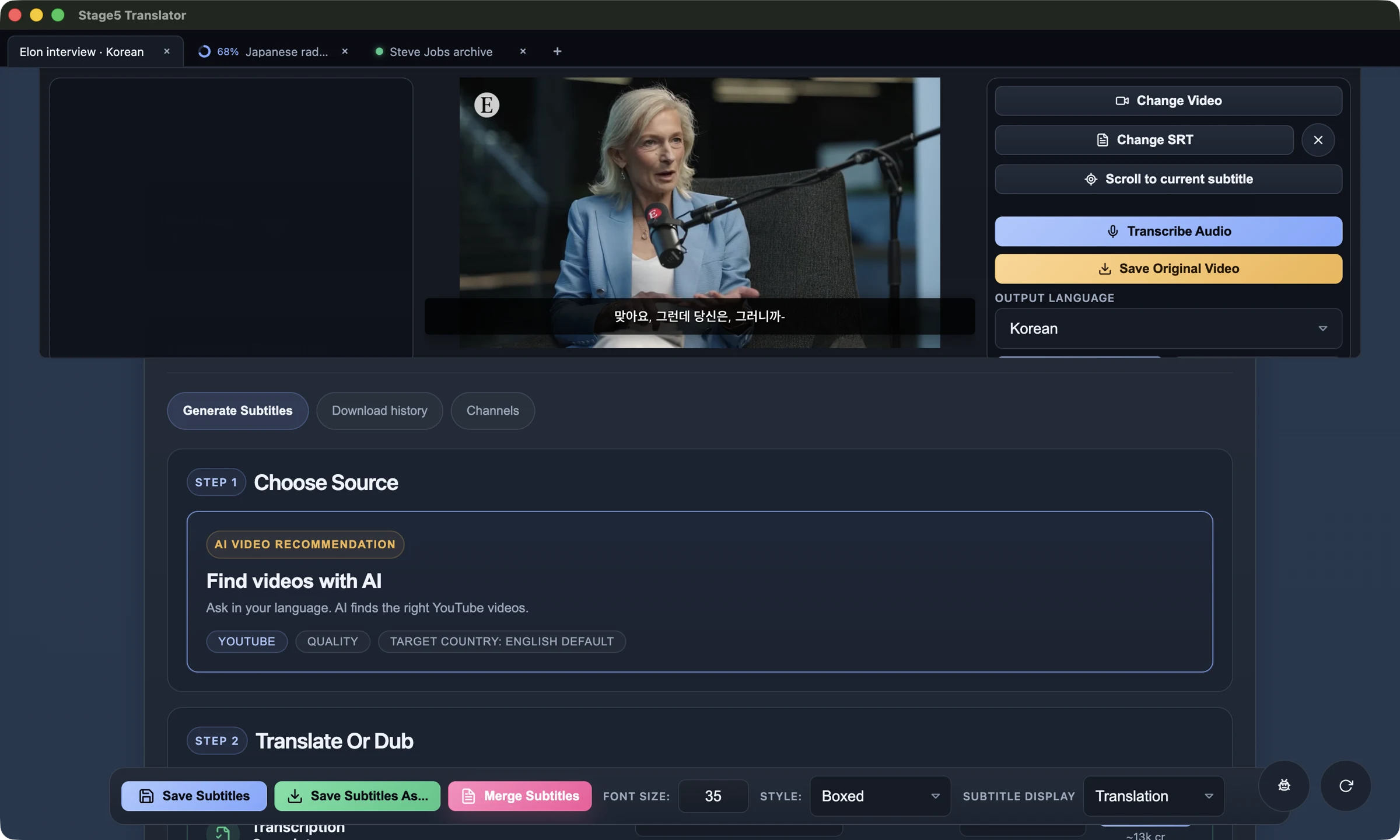
Each video keeps its own player, subtitles, edits, and live job status.
The video, transcript, translation, timing, voice, clips, and exports stay together. You spend time deciding what is good—not moving files between services.
Paste a supported video URL or open a local file. The source lands directly inside the same workspace where the rest of the job happens.
Generate timed subtitles, run a quality review pass, and inspect every line against the people, visuals, and moment on screen.
Fix wording and timing, mount existing subtitle files, compare original and translated lines, then export the format you actually need.
Open browser-style tabs for separate videos. Running jobs continue in the background, show live progress, and signal when they finish—without losing your place in the active video.


Give each video its own tab, then move between translation, review, and clipping without destroying context. Background jobs keep running and the tab strip tells you when to come back.

Choose Default, Classic, Boxed, or LineBox, adjust the text size, and use the result while watching or in the video you export.


Downloaded videos remain in the app as a visual history. Rewatch a favorite, reopen it for subtitle work, or continue where you left off.

Once you find something worth keeping, Translator can help surface standout moments and turn a full video into short clips you can actually use.
A translated text file is not a finished video. Translator keeps the source, timing, review, rendering, dubbing, and clips connected until the work is ready to use.
Translator is opinionated about the work around the model: files, timing, review, playback, exports, cost control, and the decisions that make an output publishable.
01“Two-pass translation, local processing, BYO keys, and open source is a rare combo that actually respects developers and creators.”
02“The two-pass translation idea makes a lot of sense especially for video where literal translations usually sound off.”
03“Love the 2 pass idea.”
Installed Translator 1.16.16+ includes packaged MCP tools once you enable Settings → Agent Control → Allow agent control and allowlist write folders. An agent can download videos, transcribe, translate, export SRT or burned-in video, navigate the app, snapshot settings, and control the desktop workflow through the same app you already use.
The desktop app is published under the MIT License. Read the code, build it yourself, or use the finished download.
Start with the languages people expect, then reach across the long tail when the right video or audience needs subtitles somewhere else.
Find or open a video, generate and translate subtitles, review them against the footage, then export or dub the result. Multiple jobs stay organized in tabs inside one desktop app.
Video downloading and subtitle editing/merging are free • AI transcription, translation, summary, and dubbing use credits